

How to Create a Course Outline That Delivers Real Results

Table of Contents
An effective course outline doesn’t start with a list of lessons. It starts with a clear, specific promise: the transformation your student will experience. Stop thinking about what you want to teach. Start focusing on what your students will be able to do after completing your course.
Start with Your Student's End Goal
Every successful course is built on a promise. Students are investing in a better version of themselves. Your first step is to define that "better version" in concrete terms. Everything else in your outline flows from this single point.
Avoid vague promises like "learn marketing" or "become a better writer." They are hard to measure and don't inspire action. You need to identify a tangible outcome your student can visualize.
This process flow shows how the final outline is the result of working backward from the student's transformation.
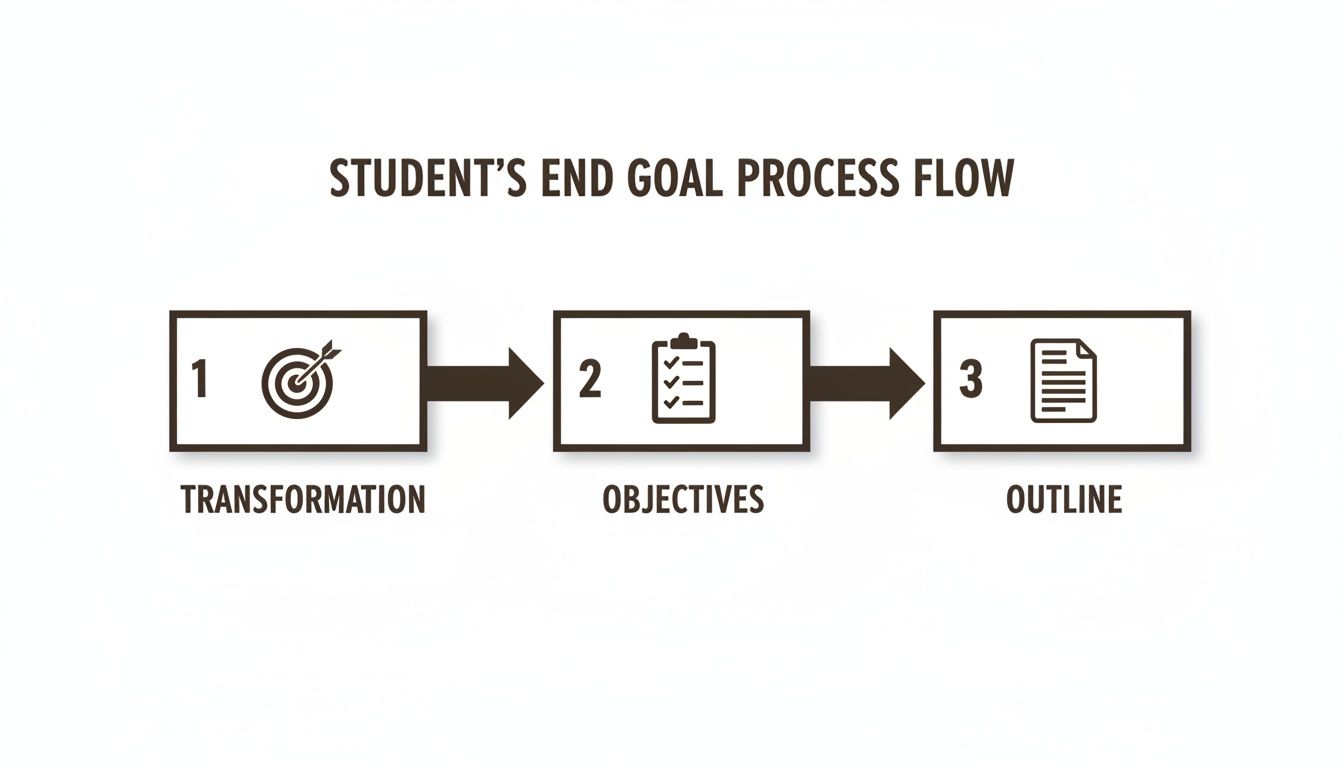
The outline is the last thing you build, not the first. It’s the map you draw only after you know the exact destination.
From Vague Ideas to Specific Outcomes
To gain clarity, translate your broad topic into measurable, real-world actions. This separates a course that feels like a random collection of videos from one that provides a clear, step-by-step journey to a goal.
Here are two examples of turning vague ideas into specific outcomes:
Vague Idea: Learn how to use Photoshop.
Specific Outcome: Design three professional social media graphics for an Instagram campaign using Photoshop’s core tools.
Vague Idea: Get better at public speaking.
Specific Outcome: Deliver a confident 5-minute presentation from memory, without relying on notes.
This level of specificity helps you and your students. It forces you to cut any content that isn’t essential for reaching the end goal, creating a more focused and effective learning path.
Using Action Verbs to Define Objectives
A practical way to define these outcomes is by using action verbs. Start every learning objective with a strong verb that describes something a student will do. This forces you to define what students will demonstrate, not just what they will passively absorb.
A great learning objective is never about what the student will "know" or "understand." It's about what they can demonstrate. This is how you move people from passive knowledge to active skill.
For example, if your course is on email marketing, break it down into tangible skills:
- Write a 5-part welcome email sequence that builds trust.
- Analyze the open rates of a sample campaign to identify what worked.
- Create a high-converting lead magnet opt-in form.
Each objective is a distinct, verifiable skill. Courses in personal development often excel at this, structuring content around specific life and professional goals.
Real-World Scenarios
Let's apply this to two different courses.
Scenario 1: A Coding Bootcamp
The goal is to help a student land their first job as a junior developer.
- Bad Objective: Learn JavaScript.
- Good Objectives:
- Build a functional to-do list application from scratch using JavaScript.
- Debug common errors in a pre-written block of buggy code.
- Integrate a third-party API to fetch and display live data in a project.
Scenario 2: A Creative Writing Workshop
The end goal is for a student to write a short story ready for submission.
- Bad Objective: Understand character development.
- Good Objectives:
- Draft a one-page character profile with a clear motivation, a core flaw, and a compelling backstory.
- Write a 3-page scene of dialogue that reveals a hidden conflict between two characters.
- Revise a messy first draft using a provided story structure checklist.
When you focus on these specific, action-oriented outcomes first, you create a clear promise. Every module, lesson, and quiz you design from this point forward will be a deliberate step on that path, ensuring your course outline is focused, effective, and delivers a real, achievable result.
Structuring Your Content for a Natural Flow
Once you know what your students will achieve, you need to build the course framework. This involves mapping out a logical, step-by-step path from their starting point to the final goal. The right sequence makes learning feel intuitive and prevents students from feeling confused or overwhelmed.

Think of it like building a house. You can't put on the roof before pouring the foundation. Your course needs the same structural integrity, with each lesson building on the last.
Choosing Your Course Structure Model
There is no single "right" way to structure a course. The best approach depends on your topic and what you are teaching. Choose a flow that mirrors how someone would naturally learn the subject.
Here are a few proven models:
- Simple-to-Complex: Ideal for skill-based topics like coding, graphic design, or software. Start with foundational concepts and gradually add more complex layers. Each lesson depends on skills learned previously.
- Chronological Flow: Use this for courses about historical events, biographies, or any process that unfolds over time. Organize modules to follow the timeline.
- Thematic or Topical: Best for abstract subjects like leadership or mindfulness. Group content into distinct themes. Each module explores a different aspect of the main topic and can often be completed in any order.
A well-structured course outline is a strategic roadmap that prevents cognitive overload. When you break a complex skill into manageable pieces, you empower students to build momentum and stay motivated.
This structure directly impacts student success. Aligning your outline of course with clear learning outcomes can improve pass rates and retention. When students see a clear path with measurable milestones, they are more likely to stick with it. You can explore data on how structured outlines drive better student results in this detailed analysis on academic success.
Breaking Down Your Topic Into Modules and Lessons
After choosing a structure, organize your topic into high-level modules. Think of these as the main chapters of your course. Each one should represent a major milestone.
Next, break each module into smaller, bite-sized lessons. A single lesson should teach one specific concept or skill. This approach makes the material easier to digest and provides students with a frequent sense of accomplishment, which is crucial for engagement.
Let's look at a practical example.
Real-World Example: A Beginner's SEO Course
Imagine you're building a course where the end goal is to "Launch a blog that ranks on the first page of Google for a target keyword." Using the simple-to-complex model, your outline could look like this:
Module 1: SEO Foundations
- Lesson 1.1: What is SEO and Why It Matters
- Lesson 1.2: How Search Engines Work
- Lesson 1.3: Key SEO Terms You Must Know
Module 2: Mastering Keyword Research
- Lesson 2.1: How to Find Low-Competition, High-Traffic Keywords
- Lesson 2.2: Using Free Tools for Keyword Analysis
- Lesson 2.3: Mapping Keywords to Your Content Plan
Module 3: Creating Content That Ranks
- Lesson 3.1: The Anatomy of a Perfectly Optimized Blog Post
- Lesson 3.2: Writing Compelling Titles and Meta Descriptions
- Lesson 3.3: Integrating Keywords Naturally
Module 4: Technical SEO Basics
- Lesson 4.1: Optimizing Your Site Speed
- Lesson 4.2: Site Structure and Internal Linking
- Lesson 4.3: Submitting Your Sitemap to Google
Each module is a major pillar of SEO, and every lesson within it teaches a specific, actionable skill. This logical progression ensures students build a solid base of knowledge before moving on to more advanced topics, creating a smooth and effective learning experience.
Designing Assessments That Prove Learning
A strong course outline includes a plan for how students will prove they've learned something. Assessments are the checkpoints that confirm your teaching is effective and that students are gaining real skills. This isn't about creating pass/fail hurdles; it's about reinforcing lessons and giving students the confidence that comes from applying their knowledge.

Think beyond the standard multiple-choice quiz. While useful for quick knowledge checks, they often test memory, not application. The best assessments challenge students to use what they've learned in a practical context.
Aligning Assessments With Learning Objectives
Every assignment in your course must have a purpose. It should tie directly back to one of your learning objectives. This connection ensures you are measuring progress toward the end goal, not just assigning busywork.
For each objective, ask yourself: "What is the best way for a student to show me they can do this?"
Here’s how this works in practice:
If your objective is: "Write a compelling headline for a blog post."
- A weak assessment: A multiple-choice quiz on headline formulas. (Tests recall).
- A strong assessment: A project where students submit five different headlines for a sample article. (Tests application).
If your objective is: "Create a basic monthly budget in a spreadsheet."
- A weak assessment: A true/false quiz on budgeting terms.
- A strong assessment: A downloadable spreadsheet template that students must fill out and submit.
Mapping assessments directly to objectives transforms your outline from a content list into a powerful tool for teaching and evaluation. The table below shows how different learning objectives lead to different types of assessments.
Matching Assessment Types to Learning Objectives
| Learning Objective Type | Primary Assessment Method | Secondary Assessment Method | Example |
|---|---|---|---|
| Knowledge & Recall | Multiple-choice or short-answer quizzes | Flashcards or memory games | A quiz on key terms from a lesson on digital marketing. |
| Comprehension | Short essay or summary submission | Peer discussion forums | Ask students to explain a complex concept in their own words. |
| Application & Practice | Practical project or case study | Simulation or role-playing | A student submits a graphic design based on a client brief you provide. |
| Analysis & Evaluation | Peer-review assignment or critique | Live debate or group discussion | Students review a classmate's business plan using a detailed rubric. |
By aligning the assessment with the skill you're building, you get a much more accurate picture of what your students can actually do.
Moving Beyond The Standard Quiz
To create a dynamic learning experience, use a variety of assessment types. This keeps students engaged and gives them multiple ways to demonstrate their expertise. Using varied, applied assessments can boost skill retention compared to courses that only use knowledge-recall quizzes.
Here are a few effective assessment types to include in your course outline:
- Practical Projects: The gold standard for skill-based courses. Have students build something—a piece of code, a marketing plan, a recorded presentation. This is where learning becomes tangible.
- Peer-Review Assignments: These foster community and sharpen critical thinking. Students can review each other's work based on a clear rubric. They learn by seeing how others approached the same problem.
- Low-Stakes Quizzes: Use short quizzes at the end of a lesson for a quick comprehension check. The goal is immediate feedback so students know if they're ready to move on.
The most effective assessments don't just measure learning—they are the learning. When a student builds a project or critiques a peer's work, they deepen their own understanding in a way a simple quiz never could.
Building Feedback Into Your Workflow
An assessment without feedback is a missed opportunity. Constructive, timely feedback guides students, helping them understand what they did right and how to improve. Plan for these feedback moments in your course outline.
Whether your course is live or self-paced, you can design feedback loops into its structure. An all-in-one platform like Kampunity makes this easy. You can leave comments on assignments, host live Q&A sessions to review projects, or create a community space for students to share their work.
When you plan for these interactions from the start, feedback becomes an integral part of the learning journey.
Real-World Course Outline Templates You Can Use
Theory is useful, but seeing a well-built course outline in action makes it real. Here are three templates for different types of courses. Use them as a starting point for your own topic.
Template 1: The Cohort-Based Masterclass
This model is perfect for an intensive program where community and live interaction are key. Everyone moves through the material together, which boosts collaboration and accountability.
Course Title: 6-Week Digital Marketing Funnel Sprint
The Promise: You will launch a complete digital marketing funnel that brings in at least 10 qualified leads.
Here's how to map out the six weeks:
Week 1: The Foundation & Your Audience
- Lesson 1: Nailing Down Your Irresistible Offer
- Lesson 2: Crafting Your Hyper-Specific Customer Avatar
- Action Item: Complete and post your Customer Avatar worksheet for peer feedback.
Week 2: Building the Lead Magnet & Landing Page
- Lesson 1: How to Create a Lead Magnet People Actually Want
- Lesson 2: Designing a Simple, High-Converting Landing Page
- Action Item: Build your landing page and share the link for instructor review.
Week 3: Crafting Your Email Welcome Sequence
- Lesson 1: The 5 Must-Have Emails for Your Welcome Sequence
- Lesson 2: Writing Copy That Connects and Converts
- Action Item: Write and load your 5-part email sequence into your email provider.
Week 4: Driving Traffic with Ads
- Lesson 1: Setting Up Your First Facebook Ad Campaign
- Lesson 2: How to A/B Test Ads on a $50 Budget
- Action Item: Launch your ad campaign and monitor the data.
Week 5: Analyzing Your Data
- Lesson 1: Understanding Key Metrics (CTR, CPL, Conversion Rate)
- Lesson 2: Optimizing Your Funnel Based on Data
- Action Item: Analyze your campaign data and share key takeaways with the group.
Week 6: Scaling Up & Final Review
- Lesson 1: Strategies for Scaling Your Ad Spend
- Lesson 2: Final Funnel Review & Live Q&A
- Action Item: Submit your final results and a one-page summary of your lessons learned.
Why this works: The structure is action-oriented. Each week builds on the last, pushing students toward a tangible result. The mix of short lessons and hands-on activities ensures students are doing, not just watching.
Template 2: The Self-Paced Technical Deep Dive
A self-paced format is ideal for teaching foundational skills like coding. It allows people to learn at their own speed, re-watching difficult parts as needed. The key is a logical flow from basics to more complex ideas.
Course Title: Python for Beginners
The Promise: You'll write a real Python script that can scrape data from a website and save it into a CSV file.
Module 1: The Absolute Basics
- Lesson 1: Setting Up Your Coding Environment
- Lesson 2: Variables, Data Types, and Operators
- Lesson 3: Your First Program: "Hello, World!"
- Quiz: Knowledge check on basic syntax.
Module 2: Control Flow
- Lesson 1: Using If, Else, and Elif Statements
- Lesson 2: Understanding For and While Loops
- Mini-Project: Write a script that prints numbers 1-100, with special conditions for multiples of 3 and 5 (the FizzBuzz challenge).
Module 3: Functions & Data Structures
- Lesson 1: Defining and Calling Functions
- Lesson 2: Working with Lists, Tuples, and Dictionaries
- Quiz: Test your knowledge of data structures.
Module 4: Building a Real Project
- Lesson 1: Introduction to Web Scraping Libraries
- Lesson 2: How to Write Data to a CSV File
- Final Project: Build the web scraper from scratch, as promised in the course goal.
Why this works: The structure is sequential. You can't understand loops (Module 2) without mastering variables (Module 1). The path guides the learner from zero to a specific, practical skill.
Template 3: The Hands-On Creative Workshop
For creative skills, an outline should prioritize practice over lectures. A workshop format gets students creating immediately.
Course Title: Graphic Design for Non-Designers
The Promise: You will design a three-piece social media brand kit (logo, color palette, post template).
Module 1: The 4 Principles of Great Design
- Lesson: A 20-minute video on Contrast, Repetition, Alignment, and Proximity.
- Activity: Find 3 examples of great design online and share why they work.
Module 2: Your New Best Friend, Canva
- Lesson: A practical screen-share tour of the essential tools in Canva.
- Activity: Recreate a simple design I provide, pixel-for-pixel.
Module 3: Creating Your Brand Kit
- Lesson 1: Choosing a Killer Color Palette and Fonts
- Lesson 2: Designing a Simple, Memorable Logo
- Lesson 3: Building a Reusable Social Media Post Template
- Project: Assemble and submit your complete brand kit for peer feedback.
Why this works: It’s completely project-focused. Students get just enough theory to be effective, then immediately apply it. The final project is the focus, and every lesson is a direct step toward completing it.
Bringing Your Outline to Life on the Right Platform
A great outline is just a plan until you give it a home. The right platform transforms your static document into a living learning environment. It doesn't just host your content; it enhances the entire experience.
Your outline is the blueprint; the platform is the house. You are adding the rooms, doors, and interactive features that make it a place people want to be.
Setting Up Your Modules and Lessons
The first step is to replicate the structure you've created. Most modern course platforms use a simple drag-and-drop interface, making this straightforward.
Create a "Module" or "Section" for each major part of your outline. Then, inside each module, add the individual "Lessons." This mirrors your structure, giving students a clear, visual path.
For example, your outline's "Module 2: Mastering Keyword Research" becomes the container. Inside it, you create separate lessons:
- Lesson 2.1: How to Find Low-Competition Keywords
- Lesson 2.2: Using Free Tools for Keyword Analysis
- Lesson 2.3: Mapping Keywords to Your Content Plan
This one-to-one mapping is critical for preserving the logical flow you designed.
Scheduling Content for Optimal Pacing
Avoid overwhelming students by releasing all your content at once. For longer courses, "drip content" is a valuable feature. It allows you to release modules on a set schedule, which keeps the group on the same page and prevents burnout.
For instance, you can set simple rules:
- Release Module 2 seven days after a student enrolls.
- Unlock Week 3's content on a specific date for the entire cohort.
This controlled release improves completion rates by turning a self-paced course into a guided journey, ensuring students master foundational concepts before moving ahead.
A great platform does more than host videos. It becomes an active partner in your teaching strategy, using features like content dripping and community integration to reinforce the learning path you’ve so carefully designed.
Building Assessments Directly Into the Flow
A powerful platform lets you build your planned quizzes and projects right where they belong—at the end of a module or lesson.
Instead of sending students to an external tool, build assessments natively. Create a multiple-choice quiz after a tough lesson or a project submission portal where students can upload their work. All-in-one platforms like Kampunity excel at creating these rich educational experiences within a single system.
Enhancing the Student Experience Beyond the Lessons
Your outline is the skeleton; the platform provides the personality. Use its features to create a holistic learning environment.
- Create Community Spaces: Set up dedicated forums for each module. This gives students a place to ask questions, share insights, and help one another.
- Host Live Q&A Sessions: Use built-in event tools to schedule live video sessions. Host them weekly to review projects or dive deeper into complex topics.
- Track Student Progress: Monitor the platform’s analytics. If many students drop off at a particular lesson or perform poorly on a quiz, that's your signal to add more resources or host a Q&A to clarify the topic.
By using these tools thoughtfully, you ensure your technology doesn't just support your course outline—it brings it to life. This is how you bridge the gap between a great plan and a course that delivers real results.
Got Questions About Your Course Outline? We've Got Answers
You will likely encounter challenges while building your course outline. Here are answers to some of the most common questions.
How Long Should My Course Be?
There's no magic number. The right course length is however long it takes to deliver on your promise—and not a minute more. Your goal is to get your student from point A to point B as efficiently as possible. If you can deliver the transformation in 3 hours, stretching it to 10 hours with filler content is a disservice.
Consider these factors:
- Topic Complexity: Teaching someone to brew coffee takes less time than teaching them to build a web application.
- Price Point: A $49 mini-course might be 90 minutes, while a $997 signature program is expected to be 15+ hours.
- The Specific Outcome: A course on "Writing Your First Novel" is a marathon. A course on "Writing a Killer Book Blurb" is a sprint.
The best course is the shortest one that still delivers the full promised transformation. Be ruthless. Cut anything that doesn't directly serve your student's end goal.
What’s the Difference Between a Module and a Lesson?
Think of your course like a book. A module is a major chapter, and a lesson is a specific section within that chapter.
Modules are the major building blocks of your course. They group related topics and represent a key milestone. For example, a module might be "Mastering Instagram Content."
Lessons are the bite-sized steps within that module, each teaching one specific skill. Inside the "Mastering Instagram Content" module, you might have lessons like:
- Lesson 1: How to Write Captions That Get Comments
- Lesson 2: Creating Eye-Catching Graphics in Canva
- Lesson 3: Understanding the Instagram Algorithm
Keeping video lessons in the 5-15 minute range is effective for maintaining student engagement.
Should I Include a Community Component?
Yes. A community turns your course from a monologue into a conversation. It's where students ask questions, share wins, and get feedback from you and their peers. This single element can dramatically increase completion and success rates.
A community needs structure to thrive. Set the tone from day one. You can use these examples of community guidelines that foster positive engagement to create a productive and positive environment. This transforms your community from an afterthought into a powerful extension of your course.
How Detailed Does My Outline Really Need to Be?
Your outline of course should be detailed enough that another expert in your field could teach from it. It is your master blueprint.
For every lesson, list:
- The one core concept or skill being taught.
- The main talking points to cover.
- Any examples or case studies you'll share.
- The activity or assessment that reinforces the learning.
This level of detail forces you to think through the entire student journey and identify gaps before you start creating content. A great outline separates a vague idea from an executable plan.
Ready to turn that detailed outline into a thriving paid learning community? Kampunity provides all the tools you need—courses, chat, events, and payments—in one seamless platform. Start building your community on Kampunity today.