

A Practical Online Course Platform Comparison for Creators

Table of Contents
Choosing an online course platform is a critical business decision. Pick the right one, and you get a smooth engine for creating courses, engaging students, and growing your revenue. Pick the wrong one, and you’re looking at frustrating technical issues and a potential migration that costs you time and money. This guide provides a practical, side-by-side comparison of platforms like Thinkific, Kajabi, and Teachable to help you find the best fit for your business.
How To Choose Your Platform
The online learning market is set to surpass $320 billion by 2025. This massive growth means more creators are launching courses, making your platform choice more important than ever. It isn't just a place to host videos; it's the operational hub for your entire business.
Don't get overwhelmed by endless feature lists. Every platform claims to be the best, but the secret is to match a platform's core strengths with what you actually need to accomplish.
Setting Your Decision Criteria
To make an informed decision, you need a clear framework. Instead of comparing dozens of features, focus on the four pillars that determine long-term success. We'll use these to evaluate each platform:
- Course Delivery: How effectively can you build and deliver an excellent learning experience? This includes video hosting, quizzes, assignments, and certifications.
- Community Engagement: Does the platform help you build genuine connections with your members? Look for discussion forums, live events, direct messaging, and member profiles.
- Monetization Flexibility: How many ways can you earn revenue? We’ll examine subscriptions, one-time sales, product bundles, and payment plans.
- Scalability and Cost: Can the platform grow with your business? We will analyze pricing tiers, transaction fees, and any hidden costs.
This approach helps you move from confusion to confidence. The goal is to find a platform that not only holds your content but actively helps you build a profitable learning community.
A great platform should act as a business partner, not just a piece of software. It should simplify your workflow, improve student engagement, and offer clear paths to grow revenue without creating technical headaches.
Quick Platform Snapshot
Before we dive deep, here’s a high-level overview of the main contenders. This snapshot will help you understand where each platform fits in the market.
| Platform | Best For | Core Strength |
|---|---|---|
| Thinkific | Beginners and course-focused creators | User-friendly course building and customization options. |
| Teachable | Creators prioritizing marketing and sales | Built-in marketing tools and flexible payment options. |
| Kajabi | Established businesses needing an all-in-one | Integrated marketing, funnels, and email automation. |
| Kampunity | Creators building paid learning communities | Unifying courses, community, events, and monetization in one place. |
Use this table as your starting point. In the following sections, we'll break down each of these criteria to give you a complete picture so you can make a decision that aligns with your vision.
Comparing Community Building Features
A course without a community is just a folder of videos. To build a sustainable business, you need more than a content delivery system—you need a space where members can connect, ask questions, and feel a sense of belonging. A platform's community features can make or break this experience.
Some platforms treat community as an afterthought, forcing you to link out to a separate Facebook Group or Discord server. This creates a clunky user experience. Asking students to watch videos on one site and discuss them on another introduces friction and kills engagement. Others, like Kajabi, offer built-in forums, but they can feel dated and lack the dynamic, real-time feel of modern community spaces.
What you need is a seamless environment for your members. Can they participate in threaded discussions, join live events, and message each other, all under your brand? The answer reveals which platform is truly designed to support a thriving, paid community.
Integrated vs. Third-Party Community Tools
The first major choice is between integrated and third-party community tools. Platforms like Teachable and Thinkific are excellent for structuring lessons and delivering content, but their native community features are limited.
If you choose a platform without integrated community tools, you will need to:
- Juggle Tools: Link out to a separate Facebook Group, Discord server, or a specialized community platform like Circle.
- Manage Multiple Logins: Your members will need one account for your course and another for your community, which is an unnecessary hassle.
- Run Disconnected Systems: You'll manage payments, content, and member conversations from different dashboards.
In contrast, all-in-one platforms like Kajabi and Kampunity build the community directly into their product. This creates a unified hub where a member can watch a lesson and immediately join a discussion without leaving your site. This integrated approach is almost always better for keeping people active and engaged.
Successful online businesses are built on connection, not just content. When a student feels seen and heard, they are far more likely to complete a course, renew a subscription, and become a long-term advocate for your brand.
What to Look For in Community Features
Beyond a simple comment thread, a great community platform provides tools that encourage real interaction. As you compare options, here’s a checklist of what to look for.
1. Discussion and Interaction A simple, linear comment feed is no longer enough. Look for features like rich media support (images, videos, GIFs), threaded conversations, and reactions. For example, if you're a photography coach, you need a space where students can easily upload their work for direct feedback—not just talk about it.
2. Live Events and Webinars The ability to host live Q&A sessions, workshops, or member-only webinars is a huge driver of engagement. Check if the platform integrates with Zoom or offers a native live-streaming tool. Can you schedule events, send automated reminders, and restrict access based on membership tiers?
3. Member Profiles and Networking This is a critical feature. Can members create their own profiles, see who else is in the community, and connect through direct messaging? These features transform a passive audience into an active network, adding significant value for everyone. For a deeper analysis, check out our guide on the best online community platforms.
The e-learning market has grown over 900% since 2000, signaling a major shift in how people learn. It's no longer just about accessing information; it's about finding flexible, engaging online experiences. Platforms that successfully merge great content with a strong community are positioned to succeed because they meet the modern learner's need for connection. You can see a full breakdown of these e-learning market statistics to understand the scale of this trend.
Ultimately, choosing a platform based on its community-building capabilities is a strategic decision. It’s a commitment to the long-term health of your business and to converting one-time customers into loyal members.
Evaluating Your Monetization Options
How you get paid is just as important as the content you teach. The right platform doesn't just process payments—it should help you earn more money. When conducting an online course platform comparison, look beyond transaction fees to see what financial flexibility each platform truly offers.
Your business model should guide your choice. Selling a high-ticket mastermind requires a different feature set than offering a low-cost introductory course. Can you easily set up subscriptions, one-off payments, or installment plans? The best platforms provide all these options to meet your customers' needs.
Consider the journey from a curious visitor to a paying member. The process must be simple. A clunky checkout is the fastest way to lose a sale, so we'll evaluate which platforms make buying easy and intuitive.
Beyond the Buy Button: Revenue-Boosting Tools
Modern platforms are more than payment gateways; they include tools designed to increase customer lifetime value. It's not just about selling a single course; it's about building a sustainable business. Pay close attention to these built-in marketing features:
- Order Bumps: Small, relevant add-ons a customer can add at checkout with a single click, like a workbook or a bonus mini-course.
- Upsells: An offer presented immediately after purchase for a more valuable product, such as private coaching or an advanced workshop.
- Affiliate Programs: A built-in system that lets partners promote your courses for a commission, expanding your reach without upfront ad spend.
The e-learning industry is growing rapidly, and the data below highlights why strong monetization features are so critical.
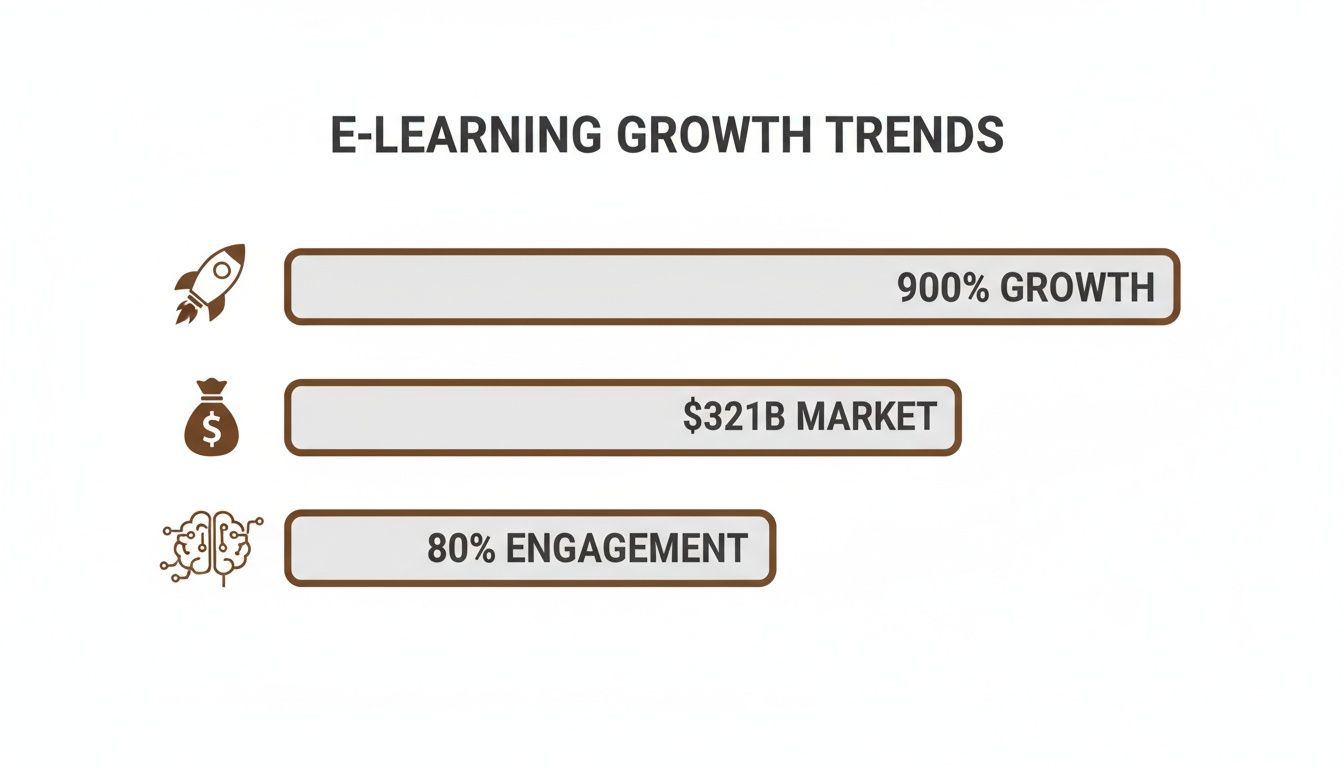
The data is clear: the market opportunity is huge, growth is accelerating, and engagement is key. A flexible monetization strategy is essential to capitalize on all three.
Subscriptions and Memberships: The New Standard
While one-time course sales are useful, recurring revenue is the foundation of a scalable online business. Platforms that excel at handling subscriptions and tiered memberships provide stability and predictable income. Both Kajabi and Kampunity were designed with this model in mind, offering powerful tools for managing recurring payments and member access levels.
Think of your platform's monetization features as a sales team working for you 24/7. The easier it is to bundle products, create payment plans, and offer upsells, the more opportunities you have to grow your revenue without manual effort.
In 2023, over 220 million people enrolled in online courses, and the subscription e-learning market is projected to reach $50 billion by 2026. This trend favors platforms built for recurring revenue over those focused solely on single sales. The future is about building long-term customer relationships.
Monetization and Community Feature Comparison
To make this practical, let's compare how the top platforms perform on features essential for selling courses and building a community.
| Feature | Kampunity | Kajabi | Thinkific | Teachable |
|---|---|---|---|---|
| Recurring Subscriptions | Yes (Core feature) | Yes | Yes (Add-on) | Yes |
| Community Platform | Built-in & Integrated | Yes (Basic) | Yes (Add-on) | Yes (Basic) |
| 1-Click Upsells | Yes | Yes | No (App required) | No (App required) |
| Order Bumps | Yes | Yes | No (App required) | No (App required) |
| Affiliate Marketing | Yes | Yes | Yes | Yes |
| Payment Plans | Yes | Yes | Yes | Yes |
| Free Trials | Yes | Yes | Yes | Yes |
| Course Bundles | Yes | Yes | Yes | Yes |
While most platforms offer the basics, the key difference lies in the built-in sales and marketing tools. Kampunity and Kajabi lead in this area, with features designed to maximize revenue out of the box.
Here’s how each platform handles a common scenario: selling a flagship course with a community membership upsell.
- Teachable: Strong for one-time sales and payment plans. You can create coupons and basic bundles, but you'll need third-party tools for sophisticated funnels with one-click upsells.
- Thinkific: Excellent for course creation with flexible pricing, but its native marketing and upsell features are limited compared to all-in-one solutions.
- Kajabi: A powerhouse for sales funnels. It excels at creating automated marketing sequences, upsells, and managing a full suite of products from one dashboard.
- Kampunity: Designed specifically for paid learning communities, it seamlessly blends course sales with recurring community subscriptions. The course-plus-community model is its core strength.
To choose the right platform, match its financial toolkit to your business goals. Before deciding, map out your ideal sales process and see which platform makes it easiest to implement. For more on what makes a course successful, check out our guide on the essential tools for creating online courses.
Matching The Platform to Your Business Stage
The right platform for a creator with 10,000 students is rarely the best fit for someone launching their first product. Your business stage determines your budget, feature needs, and growth requirements. The key is to choose a platform that fits you now but also provides room to expand.
Instead of getting lost in a long list of features you won’t use for years, let's examine this from the perspective of three creator types. Find the stage that best describes you to identify the tools that will help you reach your next milestone.
The Solopreneur Launching a First Course
You're at the beginning, ready to launch your first course. Your priorities are simplicity, a low price, and the ability to validate your idea without a large investment. You need a platform that is easy to learn, not a complex system with overwhelming analytics.
At this stage, your platform must have:
- A free or low-cost plan: Keep costs minimal while you test the market for your course.
- A drag-and-drop course builder: Focus your time on creating great content, not fighting with a clunky interface.
- Simple, reliable payment processing: A secure way to accept payments is non-negotiable.
Top Recommendations:
- Teachable is an excellent starting point. Its clean interface makes it easy to build your first course, and the built-in sales tools are sufficient for getting started.
- Thinkific offers a great free plan that lets you build and sell your first course without a monthly fee, which is perfect when every dollar counts.
The Growing Creator Building a Community
You've validated your course idea and have a small, dedicated group of students. Now, the focus shifts from just selling content to building a loyal community. You need powerful tools to foster conversations and create a premium experience that encourages retention.
At this stage, your platform needs to provide:
- Built-in community features: It's time to move from a clunky Facebook group to an integrated forum or chat space.
- More monetization options: You're ready to experiment with subscriptions, course bundles, and tiered memberships.
- Solid email marketing tools: As you grow, you need to nurture your audience and automate communications.
Your platform must become more than just a video host—it needs to be the central hub of your business. The goal is to create an environment where your students can learn, connect, and grow, all under your brand.
Top Recommendations:
- Kajabi is a true all-in-one platform ideal for creators at this stage. It includes email marketing, sales funnels, and community features, providing a complete system to build upon.
- Kampunity was designed for this exact moment. It seamlessly integrates courses, community, events, and monetization. Its primary strength is turning followers into a deeply engaged, paying community.
The e-learning market is experiencing massive growth. For instance, the average revenue per user (ARPU) in China is projected to reach $130.16, far exceeding the global average. This highlights a critical point for growing creators: success isn't just about student numbers but about the value and engagement you create for each one.
The Established Brand Focused on Scalability
You have a large audience, a suite of proven products, and a team to help you manage operations. Your priorities are now different: you need a platform that can handle massive scale, provide deep analytics, and automate tasks to manage a large student base efficiently.
The non-negotiables at this level include:
- Advanced analytics: You need detailed data on student progress, engagement, and sales to make informed decisions.
- API access and deep integrations: Your platform must connect smoothly with other specialized tools in your tech stack.
- True white-labeling and customization: You need complete control over your brand's look, feel, and user experience.
Top Recommendations:
- Kajabi’s higher-tier plans are built for this scale, offering sophisticated automation and zero transaction fees to maximize revenue.
- For creators focused on live, interactive learning, platforms specializing in cohort-based courses can be a powerful choice. This model drives high engagement and completion rates—essential for protecting your brand's reputation at scale.
Understanding the Real Price Tag: Hidden Costs and Scaling Headaches
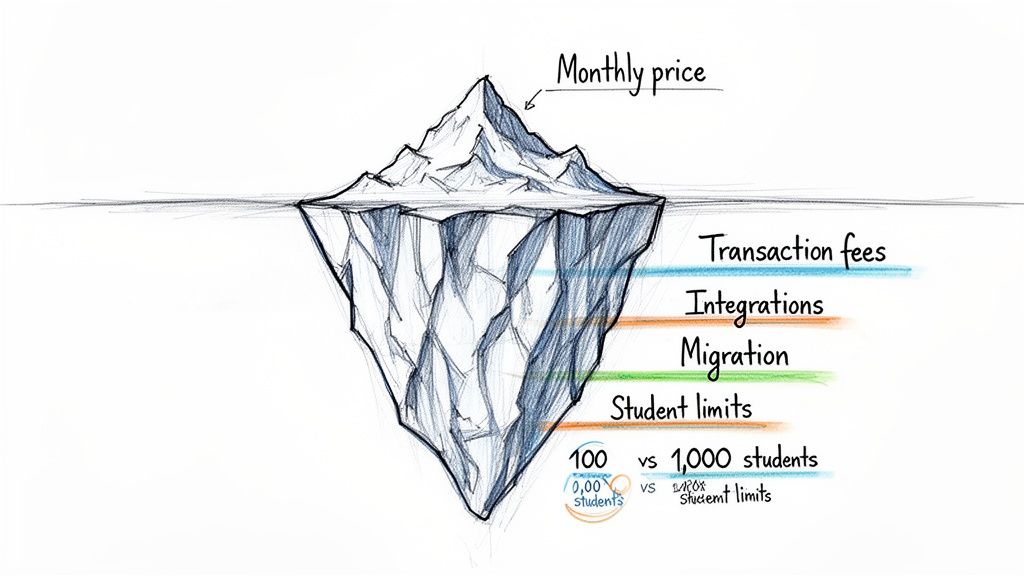
When comparing online course platforms, the advertised monthly price is rarely the full story—it's just the tip of the iceberg. The real costs, which can strain your budget and hinder growth, are often hidden. To make a smart decision, you must look beyond the sticker price and understand the total cost of ownership.
Many creators are surprised by the small fees that chip away at every sale. Transaction fees, payment processing fees, and extra charges for features you thought were included can add up quickly. That "affordable" plan can become expensive fast. It is crucial to read the fine print.
What's Your Platform Actually Going to Cost?
Your true cost is the sum of everything you need to run your business effectively. A platform may seem like a bargain initially, but if you need to add separate tools for email marketing, a community forum, and analytics, your total bill can easily double or triple.
Let's look at a cost analysis for a typical growth path.
Cost Analysis: 100 Students vs. 1,000 Students
| Cost Factor | Scenario A: 100 Students | Scenario B: 1,000 Students |
|---|---|---|
| Platform Subscription | $39/month | $199/month (after tier jump) |
| Transaction Fees (5%) | $250/month (on $5k revenue) | $2,500/month (on $50k revenue) |
| Email Marketing Tool | $20/month | $150/month (for larger list) |
| Community Plugin/App | $49/month | $99/month |
| Total Monthly Cost | $358 | $2,948 |
As you can see, costs don't just increase—they skyrocket. This is where platforms with low or zero transaction fees, like Kampunity's Pro plan, become highly valuable. As your revenue grows, this single factor can save you thousands of dollars each month.
The most expensive platform is often the one you outgrow. A painful and costly migration can set your business back months, not just financially but also in terms of momentum and member trust.
Hitting the Ceiling: Growth and Scalability Roadblocks
Beyond cost, watch out for platform limitations. Many platforms have caps that seem fine when you start but become major obstacles as your business grows. These limitations are often buried in feature comparison charts and go unnoticed until it's too late.
Be aware of these common growth-stoppers:
- Student and Course Limits: Some plans cap the number of students or courses, forcing you into an expensive upgrade sooner than expected.
- Admin User Caps: If you bring on a co-instructor or community manager, platforms that charge per admin seat can become costly as your team expands.
- Storage and Bandwidth Restrictions: If your courses are video-heavy, you can quickly exceed your storage allowance, leading to surprise overage fees.
- API and Integration Access: The ability to automate workflows or connect other business tools is often restricted to the most expensive enterprise plans.
Choosing a platform is a long-term partnership. By anticipating these hidden costs and scaling challenges, you can find a platform that is ready to grow with you. This allows you to focus on your content and community, not on fighting your software.
So, Which Platform Should You Choose?
You’ve reviewed the features, analyzed the pricing, and evaluated the community tools. It’s time to make a decision. The goal isn't to find a "perfect" platform, but to find the one that best aligns with your brand, budget, and vision.
Your platform should be a partner that simplifies your work, helps you connect with your audience, and provides clear paths for growth without technical frustrations. Let's walk through a final checklist to ensure you pick the right one.
A Quick Checklist Before You Commit
Before starting a trial, run your top choices through these final questions. An honest assessment now will save you significant headaches later.
What's Your Vibe? (Audience & Content)
- Are you building a library of self-paced video courses or focusing on live, interactive group learning?
- How important is community to your business? If forums, live events, and DMs are central to your model, a platform built around community, like Kampunity, will be a natural fit.
How Do You Get Paid? (Monetization)
- Is your model based on one-off sales, recurring memberships, or a hybrid?
- Do you need built-in sales tools like order bumps, upsells, or an affiliate program from day one?
What's the Long Game? (Scalability)
- Fast forward two years. Will this platform still support your business when you have 1,000 members instead of 100?
- Consider the true cost. Look beyond the monthly fee to include transaction fees and the cost of any additional tools you may need as you grow.
The platform that seems like a great deal today might become a limitation tomorrow. High transaction fees penalize your success, and a lack of integrated community features can force you into a frustrating patchwork of tools as you scale. Balance your current needs with your future goals.
Your Next Move
You should now have a clear frontrunner in mind. The final step is to test it out to see if it feels right in practice.
- Start a Free Trial: Don't just browse the features. Build a mini-course with a few lessons and a quiz to see if the creator dashboard is intuitive for you.
- Become Your Own Student: Log out and sign up for your mini-course. Was the checkout process smooth? Is the lesson layout clean and easy to navigate? Small frustrations for a student can become big reasons they don't complete your course.
- Outline Your First Real Offer: With your chosen platform's tools in mind, map out your flagship course or membership. Understanding its strengths and weaknesses will help you design an offer your audience will love.
Choosing a platform is about moving your business forward. Use this guide to select the one that provides the strongest foundation, and then focus on the most important part: building.
Frequently Asked Questions
Choosing the right platform for your online courses and community can be challenging. Here are answers to some of the most common questions creators ask.
What Is the Biggest Mistake Creators Make?
The single biggest mistake is focusing exclusively on course creation features while overlooking community and marketing tools. A fancy lesson builder is great, but a thriving online business depends on engagement and sales, not just content.
Viewing your platform as only a place to host videos is a major error. It should be the central hub for your entire operation—where you teach, connect with members, and generate revenue. Choosing a platform that integrates all these functions helps you avoid the clunky experience of sending students to one site for courses and a separate Facebook Group for community.
How Difficult Is It to Migrate Platforms?
Migrating from one course platform to another is a significant undertaking. It involves both technical and business challenges and requires a solid plan to avoid disrupting your community and revenue.
Technically, you must export and re-upload all of your content, including videos, PDFs, and lesson text. Migrating student data, such as user accounts, course progress, and payment information, is often a complex and manual process.
The business side of a migration is just as critical as the technical side. You must communicate the change clearly to your members, manage their expectations, and guide them through setting up new logins—all without them feeling like they’ve lost access to what they paid for.
Do I Need an All-in-One Platform?
Whether an all-in-one platform is right for you depends on your technical comfort level, budget, and business goals. A platform that bundles courses, community, email marketing, and landing pages offers a simple, unified experience for both you and your members.
The trade-off can be less customization. You could create a "best-in-class" solution using specialized tools (like a dedicated email provider and a separate community platform) to get more powerful features in each area. However, this means managing multiple subscriptions and hoping they integrate smoothly.
If your primary goal is to build a tight-knit learning community without the headache of managing multiple tools, an all-in-one platform is almost always the smarter choice.
Ready to build a thriving learning community without the technical headaches? Kampunity brings your courses, community, events, and payments together in one seamless platform. Start building for free today.